Torus Trooper, hardware-accelerated video, OpenCL compute, and a V development environment for Kakoune – with traceable APIs, memory building blocks, and documented builds.
Now open source
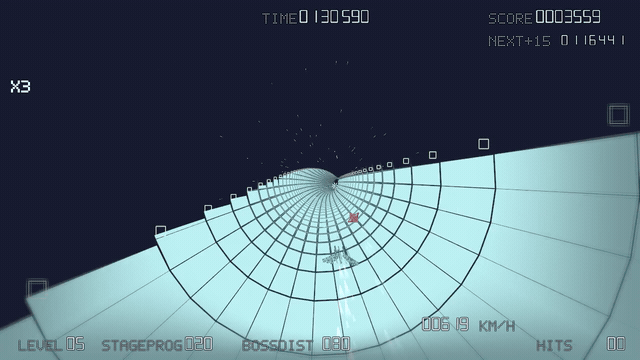
Torus Trooper
A free tunnel-racing arcade shooter in V with Vulkan graphics for Windows and Linux, inspired by Kenta Cho’s original. Its own spacecraft and courses, three difficulty modes, customizable controls, and a replay library with import and export.
Ready-to-play packages are available for Windows 10/11 x64 and Linux x64. A Vulkan-capable graphics driver is required; Linux needs glibc 2.38 or newer, such as Ubuntu 24.04. macOS is not officially supported.
Behind the arcade shooter is a deliberately separated architecture. The design guide follows input and simulation through to the final frame, explaining when a different approach might be a better fit.
01
Separate the rules from the screen
Simulation advances in fixed 60 Hz steps. Windowing, Vulkan rendering and audio live outside it, so the game rules can also be tested without opening a window.
02
Make a run reproducible
Replays record the seed, game mode and logical inputs rather than video. Playback needs compatible simulation rules; the file format alone does not guarantee that.
03
Turn state into motion
Render snapshots connect the simulation to procedural courses, spacecraft and Vulkan rendering. Interpolation smooths presentation between two simulation steps.
04
Check design decisions against evidence
The nine-part guide covers memory layouts, resource ownership, optional compute, configuration and tests. It explains measurement limits and compares alternative designs.
Developer tools / vlang.kak
A V development environment for Kakoune
A keyboard-driven V workflow: understand code, run tests and inspect a live program without leaving Kakoune.
01
Find and understand code
VLS and kak-lsp provide language features. The project explorer, search, definitions, documentation and context-aware menus keep navigation close to the source.
02
Build, test, investigate
Project tasks and tests produce navigable errors. Local GDB debugging adds breakpoints, stepping, stack frames, variables and watches.
03
Maintain the environment
An isolated launcher keeps the V setup separate from personal Kakoune configuration. Managed updates preserve user settings, with documented recovery for session changes.
Managed setup and the verified local GDB workflow target Linux. Use WSL on Windows; language features depend on the installed VLS version.
Two paths from specifications to running GPU applications
Small repositories separate API generation, data formats, memory, interface, and application code. The Vulkan Video path plays H.264; the OpenCL path computes and visualizes particles together with Vulkan.
An H.264/AVC MP4 player in V with Vulkan Video decoding, B-frame display ordering, metadata rotation, timing, resize, and looping. The current Linux prerelease improves H.264 handling and package validation; Windows hardware playback remains unverified.
01
Input
minimp4 reads the MP4 container. h264 interprets the stream and supplies metadata and picture order.
02
Decode
The Vulkan bindings expose the native API to V. The player checks the video profile and selects a compatible GPU.
03
Present
GLFW provides windowing and input, Dear ImGui supplies the interface, and vkmemalloc assists with GPU memory.
Generated OpenCL 1.0–3.0 bindings for V, typed helpers for buffers, images, and SVM, plus a particle system in which OpenCL and Vulkan share memory and synchronization.
01
Generate
v_opencl_bindings reads the canonical Khronos registry and produces traceable V bindings for OpenCL 1.0 through 3.0.
02
Use safely
opencl keeps the complete low-level API and adds opt-in typed helpers for discovery, buffers, images, SVM, events, and lifecycles.
03
Validate portably
CI exercises runtime paths on Linux and ABI builds for macOS and Windows, covering GCC, Clang, MSVC, and TinyCC.
04
Connect APIs
The particle example combines OpenCL compute with Vulkan presentation, shares memory and semaphores when available, and falls back to host staging.
Why every part matters
A video player looks like one application. In practice it solves several very different problems, deliberately separated here into understandable and reusable projects.
minimp4
Find the video data
An MP4 file is a container. minimp4 locates pictures, timing, and technical metadata inside it—much like a table of contents.
h264
Understand the compressed pictures
H.264 usually stores changes relative to other pictures. This project reads the rules, dependencies, and ordering needed to reconstruct them.
v_vulkan_bindings + vulkan
Translate between V and the graphics driver
Vulkan is the language of the GPU. The generator keeps thousands of definitions current; the bindings expose them reproducibly to V.
vulkan_memory_allocator
Manage scarce GPU memory
The V-native allocator vkmemalloc uses memory for block suballocation and adds budget-aware placement, upload rings, and diagnostics. It is not a binding to AMD’s Vulkan Memory Allocator.
glfw + imgui
Make the result usable
GLFW connects windows, screens, and input. ImGui supplies controls and diagnostic interfaces, turning a pipeline into an operable program.
v_vulkan_video
Orchestrate the whole system
The player coordinates file access, timing, reference pictures, GPU queues, presentation, and window changes into visible video.
opencl
Make compute manageable
The complete bindings stay accessible while an optional ownership and type layer simplifies buffers, images, SVM, events, and kernel calls.
v_opencl_bindings
Keep the API reproducible
The generator ties its output to fixed Khronos inputs and validates the generated surface across several platforms and compilers.
v_imgui_examples
Show the integration compactly
A tested example connects V, Vulkan, GLFW, and Dear ImGui as a short path into the graphics toolchain.
memory
Provide reusable memory building blocks
Checked object and slot pools plus range, linear, ring, and buddy allocators for V; the core works independently of Vulkan.
One picture through the structure chain
For technical readers: one H.264 picture is not “displayed” with a single call. Metadata, reference pictures, GPU resources, and synchronization are described through a linked chain of Vulkan structures.
StdVideoDecodeH264PictureInfo
Picture number, SPS/PPS IDs, Picture Order Count, and flags describe the H.264 picture independently of Vulkan resources.
VideoDecodeH264PictureInfoKHR → pNext
Adds slice count and offsets, then attaches the codec-specific description to the general decode structure through pNext.
StdVideoDecodeH264ReferenceInfo
Describes every older reference picture on which P- or B-pictures depend. Without this history, the GPU cannot reconstruct the current picture.
Connects H.264 reference data to a Decoded Picture Buffer slot and its concrete image resource.
VideoPictureResourceInfoKHR
Points through imageViewBinding to the GPU image and states its coded extent and array layer—the physical destination or reference storage.
VideoBeginCodingInfoKHR
Opens the video coding scope with the session, session parameters, and active reference slots. An optional session reset follows.
VideoDecodeInfoKHR → vkCmdDecodeVideoKHR
Collects the bitstream buffer and byte range, destination picture, current DPB slot, and every reference slot. Only now is the decode command recorded.
ImageMemoryBarrier2 + semaphore
Barriers transfer image layout and ownership between video and graphics queues; a semaphore prevents graphics from reading an unfinished picture.
SubmitInfo → draw → PresentInfoKHR
The video queue produces the picture, the graphics queue draws it into a swapchain image, and vkQueuePresentKHR hands that image to the display.